
Standing in the gym wondering which exercises target your stubborn chest, unsure if you’re doing movements correctly, or simply bored with your routine? MuscleWiki (musclewiki.com) solves these universal fitness problems with elegant simplicity: click any muscle on an interactive body diagram, and instantly see 2,000+ exercises targeting that area—complete with video demonstrations, form instructions, and equipment alternatives. No complicated apps, no fitness influencer nonsense—just straightforward exercise information when you need it.
What Is MuscleWiki?
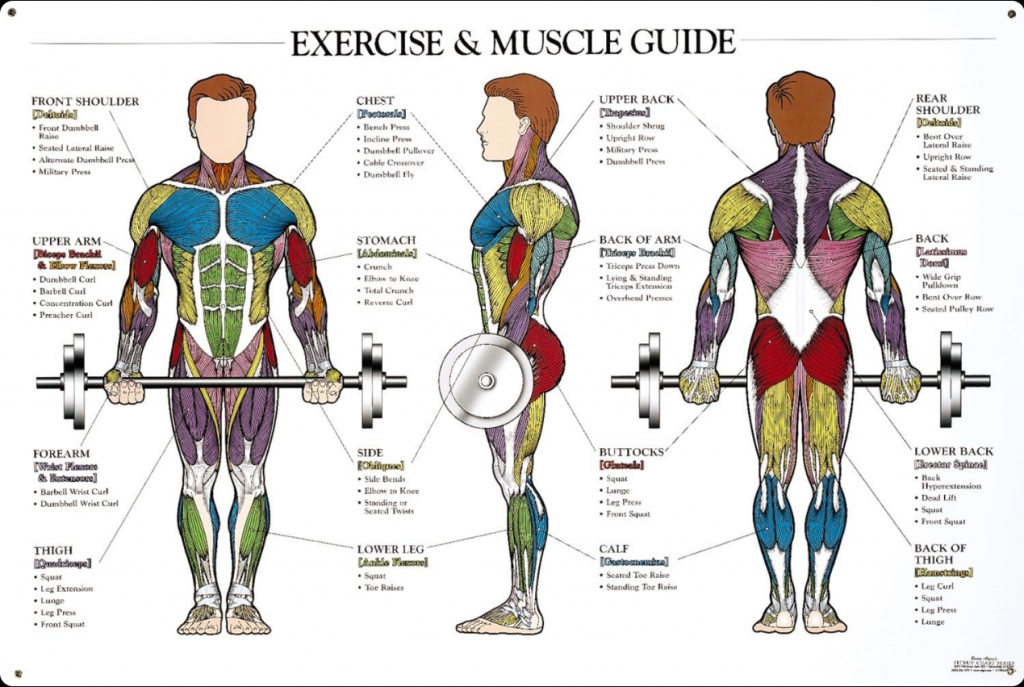
MuscleWiki is a free, comprehensive exercise database organized around an intuitive concept: select a muscle, see exercises for it. The platform features an interactive anatomical diagram where clicking any muscle group—biceps, quadriceps, glutes, abs—reveals targeted exercises with video tutorials showing proper form.
Core Features
Interactive Muscle Map
The flagship feature: a detailed body diagram covering front, back, and side views. Click shoulders, and see shoulder exercises. Click hamstrings, see hamstring movements. This visual approach makes finding exercises intuitive, especially for beginners unsure of muscle names.
Massive Exercise Library (2,000+)
Each exercise includes:
- Video Demonstrations: Clear form tutorials
- Step-by-Step Instructions: Written guidance
- Muscle Targets: Primary and secondary muscles worked
- Equipment Categories: Barbell, dumbbell, bodyweight, machine, cable, etc.
- Difficulty Levels: Beginner to advanced
Equipment Filters
Working out at home? Select “bodyweight only” to see no-equipment exercises. Have only dumbbells? Filter accordingly. This ensures you see exercises you can actually perform with available equipment.
Workout Builder & Tracker
Create custom workout routines, log exercises, track weights and reps, and visualize progress over time. The workout log functions as a digital gym journal.
Pre-Made Workout Routines
Browse structured programs for different goals—muscle gain, weight loss, strength building—and fitness levels from beginner to advanced.
AI Workout Generator (Premium)
Input your goals, equipment, and experience level, and AI generates customized workout plans tailored to your needs.
Strengths
- Core Features Free: Exercise library and body map completely free
- No Ads (Core Site): Clean, distraction-free browsing
- Intuitive Design: Visual muscle selection makes sense
- Comprehensive Database: 2,000+ exercises cover everything
- Quality Videos: Clear demonstrations with good form
- Equipment Flexibility: Home and gym workouts supported
- Beginner-Friendly: Accessible to complete novices
- Offline Functionality: Mobile app works without internet
Limitations
- Basic Workout Tracking: Not as robust as dedicated fitness apps
- Limited Exercise Variations: Some movements have few alternatives
- No Social Features: Can’t connect with friends or share workouts
- App Stability Issues: Some users report login problems
- Premium Required: AI features and advanced tracking behind paywall ($5.99/month)
Mobile Apps
MuscleWiki offers iOS and Android apps that maintain core functionality with added workout logging and offline access. The free version provides full exercise library; premium unlocks AI generation and advanced features.
Who Should Use MuscleWiki?
- Beginners: Learning which exercises target which muscles
- Home Workout Enthusiasts: Finding bodyweight alternatives
- Gym-Goers: Discovering new exercises for variety
- People Recovering from Injury: Finding safe alternatives
- Visual Learners: Prefer seeing anatomy over reading descriptions
- Budget-Conscious Fitness Fans: Want free, quality resources
Final Verdict
MuscleWiki succeeds by solving a specific problem exceptionally well: helping people find exercises for specific muscles. The interactive body map is genuinely intuitive—far better than scrolling through alphabetical exercise lists or trying to remember muscle group names.
For beginners, it’s an invaluable educational tool that demystifies gym equipment and exercise selection. For experienced lifters, it’s a quick reference for finding new movements or alternatives when equipment is occupied. The free version provides sufficient value for most users, though serious athletes may appreciate premium features.
If you’ve ever stood in a gym feeling lost, or wondered “what exercises work chest?” MuscleWiki deserves a spot in your fitness toolkit.
Rating: 4.5 out of 5 stars
Best for: Beginners, home workout enthusiasts, visual learners, anyone seeking exercise variety
Price: Free (core features) | Premium $5.99/month
Website: musclewiki.com