

Finding Build Inspiration in Minecraft Is Harder Than It Looks
Minecraft’s creative ceiling is essentially unlimited. But for players who aren’t naturally architectural — who want to build something impressive without staring at a flat field wondering where to start — the gap between “I want to build a cool house” and “I know how to build a cool house” can be surprisingly wide.
YouTube has tutorials. Reddit has screenshots. Pinterest has aspirational images that rarely come with instructions. What most players actually want is something in between: a blueprint or reference that shows them what to build and how, organized by style, difficulty, or material, without requiring them to watch a 40-minute video to extract a single design idea.
That gap is what builditapp.com attempts to fill. It’s a Minecraft-focused building resource site with a catalog of blueprints, a community post system, and a collection of building hacks. Here’s what you actually get when you visit.
What builditapp.com Offers
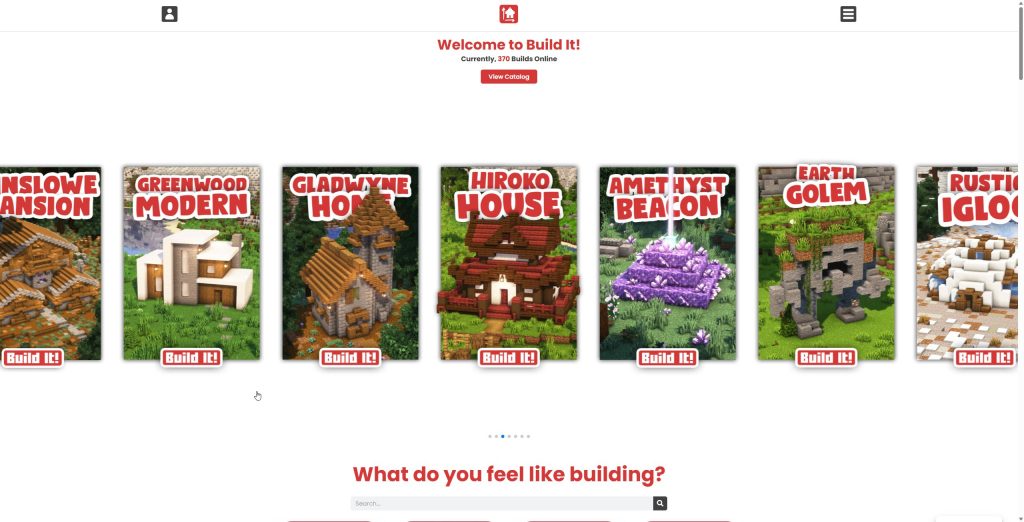
builditapp.com — subtitled “Minecraft Building Made Simple” — is a web-based resource site for Minecraft builders. The centerpiece is a catalog of build blueprints organized by style categories: Houses, Medieval, Portals, Beacons, Natural, Farms, Starter, Modern, Statues, Asian, and Desert, among others. Each catalog entry includes a visual reference for the build. The site also features a “Building Hacks” section with tips and tricks, and a community section where users share their own creations.
The catalog currently lists hundreds of builds across these categories, with both free entries and member-exclusive content. A community features component lets users post their creations using hashtags, creating a browsable gallery of player work.
- Content type: Minecraft building blueprints, style references, and building tips
- Catalog size: Hundreds of builds across multiple style categories
- Free access: Yes — a portion of the catalog is accessible without payment
- Member content: Additional builds behind a membership tier
- Community features: User-submitted build posts with hashtag system
- Building hacks: Curated tips and techniques section
- Platform compatibility: Web-based, no download required
- Domain registered: 2022 — still a relatively young site
Who Is This Site Built For?
Not every Minecraft player is the same. The site’s value varies significantly depending on where you fall on the builder spectrum.
- New Minecraft players who want visual references for what different architectural styles look like in the game
- Casual builders looking for design inspiration without committing to a long tutorial
- Players who find Pinterest and Reddit boards disorganized and want category-based browsing
- Parents or educators looking for structured build references to share with younger players
- Survival mode players planning a build and wanting to confirm it’s achievable with standard materials
- Community builders who want to share their own creations with an audience beyond their own server
- Players interested in specific architectural styles (medieval, Asian, modern) who want theme-consistent references in one place
- Builders looking for quick “hack” techniques to add detail to their existing builds
What the Site Gets Right
Organized Style Categories
The category system is genuinely useful. Instead of keyword-searching through a flat catalog or scrolling endlessly through a Pinterest board, you can go directly to “Medieval” or “Modern” or “Farms” and browse a curated selection within that aesthetic. For players who know the visual style they want but aren’t sure where to start, this organization saves real time.
The range of styles is also broader than most single-source Minecraft build sites — covering everything from starter builds for new players to desert and Asian architectural references that aren’t widely documented elsewhere.
The Building Hacks Section
Separate from the blueprint catalog, the Building Hacks section collects technique tips — small design tricks that improve the visual quality of any build. Things like how to add roof detail, how to use stairs and slabs creatively, how to avoid “box syndrome” (the flat-walled look that plagues beginner builds). This kind of content is genuinely helpful and often more actionable than a full blueprint, because it improves your building skills rather than just giving you something to copy.
Community Post Sharing
The community hashtag system lets players share their own builds to a browsable gallery. This creates a social layer around the blueprint catalog — you can see what others have built using the site’s references and get ideas from real player creations alongside the official catalog entries. For a relatively young site, having a community contribution mechanism in place is a positive sign for long-term content growth.
Free Tier Access
A meaningful portion of the catalog is accessible without a paid membership. You can browse, get inspiration, and use many of the build references without creating an account or paying anything. This makes it easy to evaluate whether the site fits your needs before committing to anything.
Where builditapp.com Needs Improvement
✅ Genuine Strengths
- Category-based catalog organization is cleaner and more browsable than most Minecraft build image boards
- Range of style categories covers both common and niche architectural themes
- Building hacks section adds practical technique value beyond pure blueprints
- Community posting system creates a social dimension that pure reference sites lack
- Free access to the core catalog requires no account or payment
- Simple, fast interface — no heavy loading or complex navigation to figure out
❌ Real Limitations to Know About
- The site was reportedly abandoned by its original owner, and some features — including the premium membership subscription and cancellation — have had reported issues on community forums; verify current status before subscribing
- Blueprints are visual references, not layer-by-layer instructions — this is inspiration, not step-by-step guidance
- No 3D viewer or interactive blueprint walker — competing sites like Buildguides.net offer layer-by-layer 3D views that builditapp.com doesn’t
- The member-only content wall creates uncertainty about what you’re actually getting before paying
- Build catalog doesn’t indicate material lists, block counts, or difficulty ratings — context that would improve usability
- Community posts vary widely in quality with no clear moderation or curation visible
How It Compares to Alternatives
vs. Buildguides.net
Buildguides.net has emerged as a direct alternative that addresses builditapp.com’s most significant structural gap: it offers a layer-by-layer 3D viewer where you can step through a build at your own pace, rotate the view, zoom in, and use a “Measure Mode” to understand block counts and dimensions. For players who want to actively replicate a build in Minecraft rather than simply reference a finished image, that 3D walker is a substantial advantage. builditapp.com’s category organization and building hacks section give it some usability edge in discovery, but for actually following a blueprint, Buildguides.net is currently more functional. Bottom line: Use builditapp.com to find a style you like, then check Buildguides.net for a version of that build with step-by-step 3D instructions.
vs. YouTube Minecraft Tutorials
YouTube has an enormous catalog of Minecraft building tutorials from channels with millions of subscribers — videos that walk you through every block placement with commentary. The depth is unmatched. But finding the right video for the style and scale you want requires navigating search results, watching thumbnails, and often sitting through a long video to confirm the build is what you imagined. builditapp.com’s catalog gives you a visual gallery to browse quickly before deciding whether to invest in watching a full tutorial. The two aren’t in competition — they’re sequential. Bottom line: Browse builditapp.com first for quick visual inspiration, then find a YouTube tutorial for the build you’ve decided on.
Pricing
- Free access: Core catalog browse, building hacks, and community posts — no account required
- Member tier: Unlocks additional blueprint catalog entries — pricing should be confirmed on the site directly before subscribing
- Important note: Community reports suggest the original site owner is no longer actively managing the platform; verify the current status of the membership and subscription management before paying
Browse the free catalog first and make your own assessment before any payment: visit builditapp.com →
Use It — or Look Elsewhere?
builditapp.com works well for:
- Players who want quick visual browsing of Minecraft build styles by category
- Builders looking for style inspiration rather than step-by-step instructions
- People who find image boards and social media disorganized for build discovery
- Players interested in niche architectural styles (Asian, desert, medieval) that are harder to find on generic platforms
- Beginners who want to see what different styles look like in Minecraft before committing to a build project
- Community-oriented players who want to share their own builds with an audience
- Players looking for quick building technique tips without watching a tutorial video
- Anyone exploring the free catalog — no commitment required to get value from it
Look for alternatives if you:
- Need layer-by-layer, block-by-block instructions to replicate a build — consider Buildguides.net instead
- Want to see builds from multiple angles in a 3D interactive viewer before starting
- Are an advanced builder looking for complex, large-scale architectural projects
- Need block counts and material lists before starting a survival mode build
- Are considering a paid membership — research current site maintenance status first given community reports
- Want a consistently active and moderated community — activity levels vary
Final Verdict
builditapp.com has a genuinely good concept and some useful execution. The category system is well-organized, the style range is broader than most Minecraft build sites, and the building hacks section adds real practical value beyond the blueprint catalog. For quick visual inspiration and style discovery, it works.
The limitations are structural. Blueprints without layer-by-layer instructions are reference material, not build guides — and players who want to actively replicate something need more than a finished image. The concerns around site maintenance and premium subscription management are real flags that should be taken seriously before any payment.
Used as a free inspiration source alongside other tools — YouTube for tutorials, Buildguides.net for step-by-step instructions — it earns a place in a Minecraft builder’s toolkit. Approached as a primary, paid resource for serious builds, it asks for more trust than it currently earns.
Rating: 3 / 5 stars — A useful free visual reference for Minecraft build inspiration, let down by limited instructional depth and unresolved questions about the premium tier. Use the free access; research before subscribing. Browse the free catalog at builditapp.com →
Disclosure: This article contains affiliate links. We may receive compensation if you click through and take action. Our editorial assessments are independent and not influenced by those relationships.