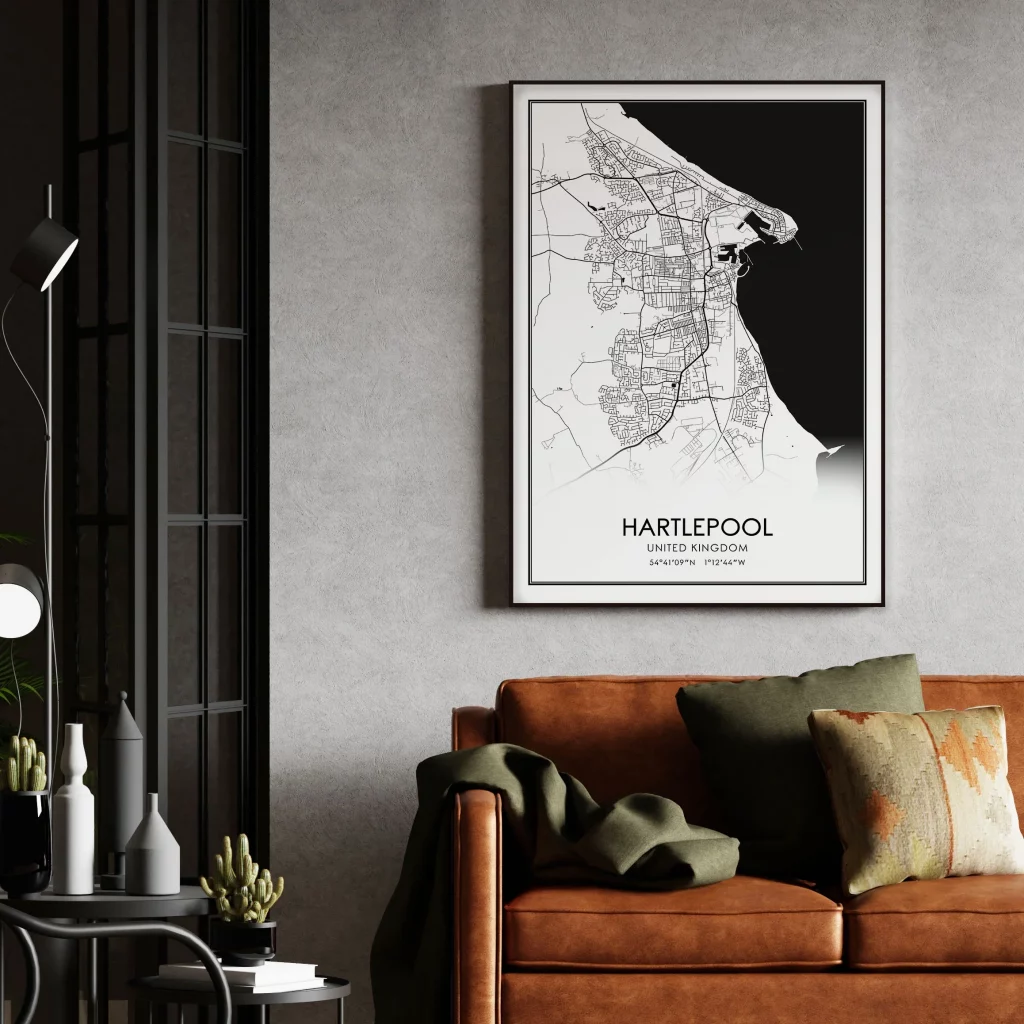

There’s something deeply personal about map art—it transforms geographic coordinates into emotional connections. Whether it’s your childhood hometown, the place you got engaged, your dream travel destination, or a city that shaped your life, Carto-Art (carto-art.vercel.app) lets you turn any location on Earth into a professional-quality poster ready for your wall. Best of all, it’s completely free with no watermarks, no accounts, and print-ready quality.
What Is Carto-Art?
Carto-Art is a free, browser-based map poster creator that generates custom cartographic artwork from any location worldwide. Built on modern web rendering technology, it offers gallery-quality output suitable for professional printing at sizes up to 24×36 inches at 300 DPI—the standard for sharp, detailed prints.
The platform has been embraced by over 10,000 users who’ve created everything from minimalist city maps to dramatic terrain visualizations. The tool runs entirely in your browser with no backend servers, meaning it’s fast, private, and requires no signup.
Key Features
Global Search Capability
Search anywhere on Earth—from major cities to small villages, mountain peaks to your childhood street. The platform’s comprehensive global database ensures extreme precision regardless of location obscurity.
Curated Design Themes
Choose from professionally designed aesthetic styles:
- Minimal: Clean, modern monochrome designs perfect for contemporary spaces
- Vintage: Classic cartographic styling with aged paper aesthetics
- Dark: Dramatic high-contrast designs for bold statements
- Topographic: Vibrant terrain heatmaps showing elevation and landscape features
Each theme completely transforms the same location into unique art pieces, allowing you to find the perfect mood for your space.
Real 3D Terrain Rendering
Unlike flat map posters, Carto-Art incorporates real elevation data to create realistic hillshading. Mountains, valleys, and terrain features appear to jump off the page with three-dimensional depth, adding visual interest and geographic authenticity.
Customizable Map Elements
Toggle individual map components on and off:
- Streets and road networks
- Place labels and city names
- Building footprints
- Water bodies (rivers, lakes, oceans)
- Parks and green spaces
- Topography and elevation lines
This granular control lets you create anything from dense urban maps to simplified landscape views.
Professional Typography Controls
Add custom titles with designer-level control:
- Custom title text and sizing
- Adjustable letter spacing (kerning)
- Coordinate overlays showing exact latitude/longitude
- Multiple font options
Print-Ready Export
Download at massive resolution—up to 24×36 inches at 300 DPI—ready for professional printing services. The vector-sharp output ensures crisp lines without pixelation, even at poster size.
How It Works
- Search Your Location: Enter any place name, address, or coordinates
- Choose Your Style: Select from minimal, dramatic, vintage, or modern themes
- Customize Elements: Toggle map features and adjust terrain rendering
- Add Your Text: Include custom titles, subtitles, or coordinate overlays
- Export: Download your print-ready poster with no watermarks
The entire process takes just a few clicks, with real-time preview showing exactly how your final poster will look.
Popular Use Cases
- Wedding Gifts: Maps of where couples met, got engaged, or married
- Housewarming Presents: New homeowners’ neighborhoods as personalized art
- Travel Memories: Favorite vacation destinations or bucket list locations
- Hometown Pride: Celebrating where you grew up or currently live
- Office Decor: Company headquarters or regional office locations
- Family Heritage: Ancestral hometowns or family origin points
- Special Occasions: Birth locations, retirement destinations, anniversary sites
Strengths
- Completely Free Forever: No subscriptions, no hidden costs, no watermarks
- No Account Required: Start creating immediately with zero barriers
- Professional Quality: Print-ready resolution suitable for gallery framing
- Privacy-Focused: Runs entirely in browser with no backend servers
- Global Coverage: Every village, city, and mountain peak worldwide
- Multiple Styles: Variety of aesthetic options from one platform
- Real Terrain Data: Authentic elevation rendering for geographic accuracy
- Fast Performance: Instant rendering without upload/processing delays
- Community Gallery: Browse thousands of user-created maps for inspiration
Limitations
- Browser-Based Only: No dedicated desktop or mobile apps
- Style Constraints: Limited to pre-defined themes (can’t create fully custom color schemes)
- No Saved Projects: Can’t save works-in-progress; must complete designs in one session
- Learning Curve for Complex Maps: Finding the perfect zoom level and element balance takes experimentation
- Variable Quality by Location: Data density varies—urban areas offer more detail than remote regions
Comparison to Paid Alternatives
Commercial map poster services like Mapiful and Grafomap charge $20-50+ per poster with similar customization options. Carto-Art delivers equivalent or superior results for free, making professional cartographic art accessible to everyone.
Key advantages over paid services:
- No per-poster costs
- 3D terrain rendering (rare in competitors)
- Higher maximum resolution options
- No watermarks even on free tier
- Faster workflow (no checkout process)
Who Should Use Carto-Art?
Carto-Art serves diverse audiences:
- Gift Givers: Creating thoughtful, personalized presents
- Interior Designers: Sourcing location-specific artwork for clients
- Travel Enthusiasts: Documenting adventures and dream destinations
- Real Estate Professionals: Creating neighborhood maps for listings
- Event Planners: Designing location-themed wedding or party decor
- Educators: Creating visual teaching materials about geography
- Anyone: Who wants beautiful, meaningful wall art without paying premium prices
Tips for Best Results
- Experiment with Zoom Levels: Closer views show street detail; wider views reveal geographic context
- Match Style to Space: Minimal works in modern homes; vintage suits traditional decor
- Use Terrain Features: Coastal cities, mountainous regions, and river valleys benefit most from 3D rendering
- Simplify Busy Maps: Toggle off labels or streets in dense urban areas for cleaner designs
- Consider Coordinate Overlays: Adding lat/long coordinates adds technical sophistication
- Browse the Gallery: See how others have designed similar locations
Community and Inspiration
Carto-Art’s community gallery showcases thousands of user-created posters, demonstrating the platform’s versatility. From minimalist Manhattan to topographic Swiss Alps, the gallery serves as both inspiration and proof of concept for what’s possible.
Final Verdict
Carto-Art represents the best kind of web tool: powerful, free, and genuinely useful. By removing financial barriers to professional cartographic art, it democratizes personalized decor and meaningful gift-giving. The combination of global coverage, multiple aesthetic styles, real terrain rendering, and print-ready quality creates a platform that rivals or exceeds commercial alternatives costing hundreds of dollars annually.
The tool’s browser-based architecture ensures privacy while delivering instant results. No uploads, no accounts, no subscriptions—just beautiful maps of places that matter to you.
For anyone seeking to transform geographic locations into emotional art, Carto-Art delivers. It’s perfect for commemorating life events, celebrating places, or simply adding beautiful, meaningful decoration to your space. The fact that it’s completely free makes it an absolute no-brainer to try.
Whether you’re decorating your first apartment, searching for the perfect wedding gift, or building a travel memory wall, Carto-Art provides professional-quality results without the professional-level price tag.
Rating: 4.5 out of 5 stars
Best for: Gift givers, home decorators, travel enthusiasts, anyone wanting personalized map art
Price: Completely free with no watermarks or restrictions
Website: carto-art.vercel.app
Print-ready resolution: Up to 24×36″ @ 300 DPI