
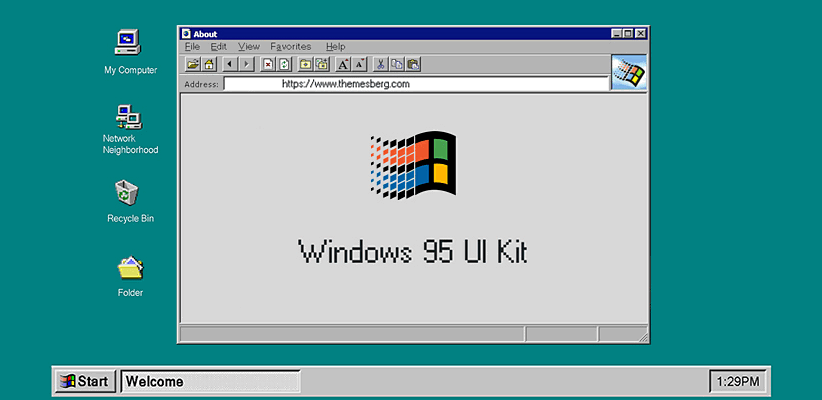

Remember the satisfying click of the Windows 95 Start button? The joy of playing Minesweeper during computer class? The distinct aesthetic of classic Mac OS? Emupedia.net (emupedia.net) transforms these memories from nostalgia into interactive experiences, offering a browser-based digital museum where you can boot up vintage operating systems, run classic software, and play retro games—all without downloading a single emulator or ROM file.
What Is Emupedia?
Emupedia (short for Emulation Encyclopedia) is a nonprofit, open-source preservation project dedicated to digitally archiving and making accessible the software and games of computing’s past. Founded in 2016, the platform allows users to experience vintage operating systems including Windows 95, Windows 98, Windows ME, and various classic applications entirely within a modern web browser—no installations, downloads, or technical knowledge required.
The project’s crown jewel is EmuOS, a meticulously recreated virtual desktop environment that mimics classic Windows interfaces. Within seconds of visiting emupedia.net, you’re transported back in time, clicking through start menus, opening applications, and experiencing computing history as if you’d fired up an actual machine from the 1990s.
The Mission Behind the Magic
Emupedia exists for more than just nostalgia—though that’s certainly part of the appeal. The project serves three critical functions:
- Digital Preservation: As physical hardware deteriorates and software becomes obsolete, projects like Emupedia ensure that computing history doesn’t vanish
- Educational Resource: Students, developers, and technology historians can explore how modern computing evolved by experiencing interfaces and workflows from previous eras
- Accessibility: Younger generations who never experienced pre-millennium computing can understand the foundations that modern systems are built upon
The project operates under the recognition that video game and software preservation falls into legal gray areas. Through Library of Congress exemptions to the DMCA, certain preservation activities are permitted, particularly within museums and libraries. Emupedia operates transparently, processing DMCA removal requests within five business days and maintaining clear intellectual property policies.
What You Can Experience
Classic Operating Systems
The platform recreates several vintage OS environments:
- Windows 95: The revolutionary interface that brought the Start button and taskbar to millions
- Windows 98: Improved stability and the Internet Explorer integration that defined late-90s computing
- Windows ME: The final consumer-focused DOS-based Windows release
- Classic Mac OS Elements: Select Mac interface components and applications
Each environment includes authentic UI elements, sounds, and behaviors that recreate the original experience with surprising accuracy.
Retro Software and Applications
Beyond operating systems, Emupedia hosts numerous classic applications:
- Microsoft Office suites from various eras
- Classic web browsers like Internet Explorer and Netscape Navigator
- Media players including Windows Media Player and Winamp
- Productivity tools and utilities
- Educational software from the CD-ROM golden age
Vintage Games Library
The gaming section resurrects hundreds of classic titles:
- Built-in Windows Games: Minesweeper, Solitaire, 3D Pinball Space Cadet
- DOS Classics: Oregon Trail, Commander Keen, Prince of Persia
- Early PC Games: SimCity, Doom, Duke Nukem
- Casual Classics: Pac-Man, Tetris variations, puzzle games
How It Works
Using Emupedia couldn’t be simpler:
- Visit the Website: Navigate to emupedia.net/beta/emuos/
- Wait for Loading: EmuOS loads in your browser (typically 10-30 seconds depending on connection)
- Explore the Desktop: Click the Start button or desktop icons to launch applications
- Play Games: Browse the games folder and double-click titles to launch them
- Experiment Freely: Nothing you do affects your actual computer—it’s all sandboxed within the browser
Everything runs using JavaScript and modern web technologies, with no plugins, downloads, or installations required. The entire experience happens client-side in your browser.
Key Features
Authentic Recreation
The attention to detail is remarkable—from the distinctive Windows 95 startup sound to the way windows snap and resize, Emupedia captures the feel of classic computing with impressive fidelity.
Zero Setup Required
Unlike traditional emulation which requires downloading emulator software, BIOS files, and game ROMs, Emupedia works instantly in any modern browser. Perfect for restricted environments like school or work computers where software installation isn’t permitted.
Cross-Device Compatibility
Works on Windows, Mac, Linux, Chromebooks, and even tablets and smartphones (though desktop experience is optimal for full functionality).
Community-Driven Development
As an open-source project hosted on GitHub, Emupedia benefits from community contributions. Developers can submit improvements, add new software, or enhance existing emulations.
Safe and Secure
Because everything runs in your browser’s sandboxed environment, there’s minimal security risk. You’re not downloading potentially malware-infected files or running questionable executables on your actual system.
Strengths
- Completely Free: No subscriptions, ads, or hidden costs
- Instant Access: Works immediately without downloads or setup
- Historically Valuable: Preserves computing history for future generations
- Educational Tool: Perfect for technology courses or computer science history lessons
- Nostalgia Factor: Genuinely enjoyable trip down memory lane for those who lived through these eras
- Broad Compatibility: Runs on virtually any device with a modern browser
- Safe Exploration: Sandboxed environment prevents any system damage
- Open Source: Transparent development and community involvement
- No Account Required: Start using immediately without registration
- Regular Updates: Community continues adding software and improving emulation
Limitations and Challenges
Legal Gray Areas
While emulation technology is legal and Emupedia operates as a nonprofit preservation project, distributing copyrighted software without authorization raises intellectual property concerns. The platform acknowledges this and processes removal requests from copyright holders promptly.
Performance Limitations
- Browser-Based Constraints: Running complex emulation in JavaScript is inherently less efficient than native software
- Occasional Lag: Some games or applications may run slower than on original hardware
- Incomplete Library: Not every classic game or program is available
- Save Limitations: Game progress may not persist across sessions unless browser storage is enabled
Accessibility Issues
The project has experienced periodic downtime and domain changes due to hosting challenges and legal pressures. Mirror sites exist (emupedia.digital, emupedia.fit) but availability isn’t always guaranteed.
Mobile Experience
While technically functional on smartphones and tablets, the desktop-oriented interface isn’t optimized for touchscreens, making navigation awkward on mobile devices.
Who Should Use Emupedia?
Emupedia serves several distinct audiences:
- Nostalgia Seekers: Anyone who wants to relive their computing childhood
- Educators: Teachers covering computer science history or technology evolution
- Students: Those learning about operating system design or software development history
- Developers: Programmers interested in how earlier interfaces solved UX challenges
- Historians: Technology archivists documenting computing evolution
- Curious Minds: Younger users wanting to understand what computing was like before smartphones
- Retro Gaming Fans: Players who enjoy classic games casually
Similar Preservation Projects
Emupedia joins other important digital preservation efforts:
- Internet Archive: Hosts vast libraries of preserved software and games
- ClassicReload: Focuses on DOS-era PC gaming
- My Abandonware: Extensive collection of old PC games
- PCjs Machines: Browser-based emulation of vintage computers
Each serves the broader goal of ensuring digital history remains accessible.
Ethical Considerations
Using Emupedia raises questions worth considering:
- Preservation vs. Piracy: Is this cultural preservation or copyright violation?
- Abandonware Ethics: Many titles are no longer commercially available anywhere—does preservation justify distribution?
- Educational Value: Does the historical and educational benefit outweigh legal concerns?
- Supporting Creators: When legal options exist, purchasing supports continued software development
Emupedia operates transparently within these complexities, acknowledging intellectual property rights while arguing for the cultural importance of software preservation.
Tips for Best Experience
- Use Desktop/Laptop: Desktop browsers provide the optimal experience
- Modern Browser: Chrome, Firefox, or Edge work best (Safari has some compatibility issues)
- Be Patient: Initial load can take 30+ seconds on slower connections
- Explore Menus: Many applications and games are “hidden” in Start menu folders
- Check Mirrors: If main site is down, try emupedia.digital or emupedia.fit
- Save Often: Not all games support browser-based save states
The Cultural Significance
Emupedia represents more than just a collection of old software—it’s a digital museum preserving a crucial period of technological transformation. The 1990s and early 2000s saw computing transition from specialized business tools to ubiquitous household items. The interfaces, design philosophies, and user experiences from this era directly influenced everything we use today.
By making these systems accessible, Emupedia ensures that future generations can understand this evolution firsthand rather than through screenshots and descriptions alone.
Final Verdict
Emupedia succeeds brilliantly at its core mission: preserving and presenting computing history in an accessible, engaging format. The ability to boot Windows 95 in your browser and play Minesweeper or explore classic software is both delightful and educational.
The legal complexities surrounding software preservation remain thorny and unresolved. However, Emupedia’s nonprofit status, transparent operation, and responsiveness to copyright concerns position it as thoughtfully as possible within this challenging landscape.
For anyone curious about computing history, seeking a nostalgic experience, or educating students about technological evolution, Emupedia offers unique value. It’s a digital time machine that makes the past interactive and the evolution of technology tangible.
Just remember that while exploring is free and legal, understanding the nuanced copyright considerations enhances responsible use of this remarkable preservation project.
Rating: 4 out of 5 stars
Best for: Nostalgia enthusiasts, technology educators, computer science students, retro gaming fans, anyone curious about computing history
Price: Completely free
Website: emupedia.net (also available at emupedia.digital and emupedia.fit)
Note: Be aware of copyright considerations when using software preservation platforms