

The Road Trip Tool Nobody Told You About
Most road trip planning looks the same. You load Google Maps, pick a route, and drive it. Maybe you search “restaurants along I-40” or “national parks near Phoenix.” What you almost certainly don’t search for is the World’s Largest Ball of Sisal Twine, or the mystery spot with gravitational anomalies in Santa Cruz, or the abandoned drive-in theater two miles off your route that absolutely deserves a thirty-minute detour.
Those things exist everywhere. They’re the texture of American road trips — weird, specific, inexplicable landmarks that local communities are oddly proud of and that no mainstream travel app will ever suggest to you. Finding them normally requires either deep prior knowledge or the kind of hypnotic Wikipedia spiral that starts at “List of unusual places in Texas” and ends three hours later with seventeen browser tabs.
makemydrivefun.com is a single-purpose tool that solves this specific problem. Enter your start and end points, and it shows you every oddball, offbeat, and genuinely interesting roadside attraction along your path. That’s the whole pitch — and it delivers it cleanly.
What the Site Actually Does
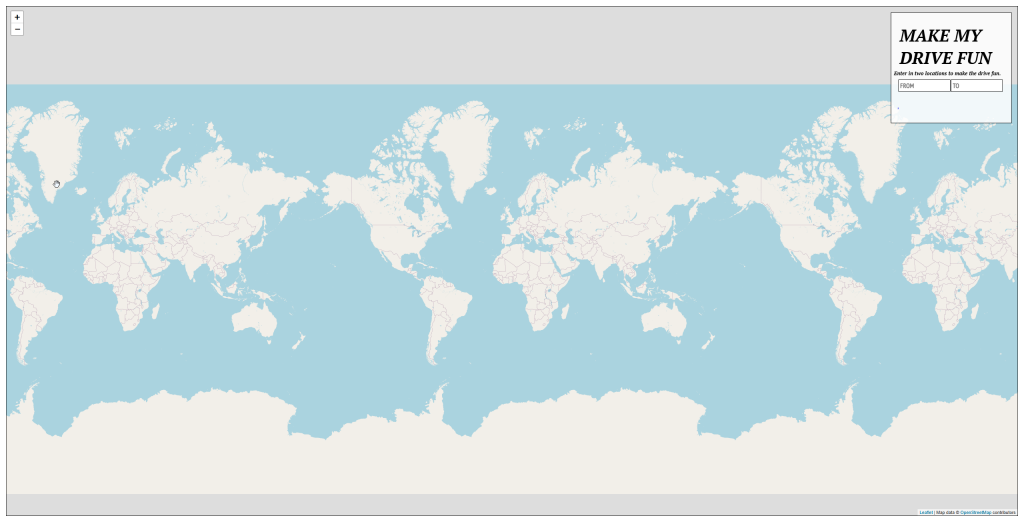
The interface is deliberately minimal. You type in a starting location, type in a destination, and the tool generates a map showing points of interest scattered along your route. Each marker is a clickable pin that shows the name, description, and coordinates of the attraction. The data draws from a database of roadside Americana — the category of travel content popularized by sites like Roadside America, covering everything from giant sculptures and tourist traps to historic oddities and quirky local museums.
There are no filters, no booking integrations, no user reviews, and no advertising algorithms pushing sponsored results. It’s a stripped-back discovery map. You see what’s there, click what interests you, and decide what’s worth stopping for.
- Tool type: Route-based roadside attraction discovery map
- Input required: Start location + destination
- Output: Interactive map of attractions along the route
- Data type: Roadside Americana, quirky attractions, tourist landmarks
- Account required: No
- Cost: Free
- Mobile friendly: Limited — desktop experience is significantly better
- Coverage: Primarily USA-focused
What Makes It Worth Keeping in Your Road Trip Planning Toolkit
It Surfaces Things No Mainstream App Will Show You
This is the irreplaceable thing. Google Maps, Apple Maps, TripAdvisor — these platforms surface results that have commercial gravity: hotels, chain restaurants, national parks with established visitor infrastructure. Makemydrivefun.com’s database is built from a different tradition. The World’s Largest Peanut. A 30-foot tall Paul Bunyan. A painted rock formation locals have been maintaining for decades. These things exist, they’re worth stopping for, and you’ll never see them on mainstream travel platforms.
Zero Friction Entry
No account. No app download. No email. You type two cities and you get a map. The accessibility is the product here — this isn’t a platform trying to capture your data. It’s a tool that does one thing in about fifteen seconds.
It Changes the Energy of the Drive
Knowing there’s a giant fiberglass dinosaur thirty miles ahead turns a dead stretch of highway into something to look forward to. That psychological shift — from enduring the drive to participating in it — is real, especially with kids. The site doesn’t change your route. It changes your relationship to it.
Works Well as a Pre-Trip Scan
The best use of makemydrivefun.com is a ten-minute session the night before you leave. Load your route, scan the map, pick two or three stops that sound interesting, save the coordinates, and move on. You don’t need to interact with it extensively — the value comes from that single scan, not from extended use.
The Honest Pros and Cons
✅ Genuinely Good
- Discovers roadside attractions that no mainstream mapping or travel app surfaces
- No account, no sign-up, no friction — input two places, get a map immediately
- Free with no advertising or upsell interruptions in the core tool
- Genuinely useful for family road trips, especially with kids who need points of interest to look forward to
- Works best for US travel where the roadside Americana database is richest
- Minimal design means fast loading and no confusing UI to decode
❌ Real Limitations to Know
- Not mobile-friendly — the map and tool are significantly harder to use on a phone, which is when you actually need it
- No filtering by category, distance from route, hours of operation, or admission cost
- Database accuracy varies — some listed attractions may be closed, removed, or changed since the data was captured
- International coverage is thin — most utility is US-specific
- No direct links to attraction websites or Google Maps for navigation — coordinates only, requiring manual lookup
- The tool works best on desktop for pre-trip planning rather than in-car use
How It Compares to Similar Tools
vs. Roadside America
Roadside America is the established authority on quirky American roadside attractions — a database built over decades with detailed descriptions, photographs, and user reviews. Its content depth per attraction is far greater than makemydrivefun.com. But finding attractions along a specific route on Roadside America requires searching by state or region rather than plotting a path. You know roughly where you’re going, but you’re not getting a route-coherent map. Makemydrivefun.com’s route-input model is the more efficient interface for pre-trip discovery, even if Roadside America has richer data per entry. Bottom line: Use makemydrivefun.com to discover what’s along your specific route, then look up individual attractions on Roadside America for full details and recent visitor reports.
vs. Google Maps “Explore” Feature
Google Maps shows attractions near any location, including some local oddities — but its recommendations are shaped by commercial signals, review volume, and sponsored placement. A roadside dinosaur park with no Google Business profile and fifty reviews will never surface above a chain restaurant with thousands. Makemydrivefun.com ignores commercial gravity entirely. The result is a fundamentally different category of discovery. Bottom line: Google Maps for navigation and operational businesses; makemydrivefun.com for the weird, specific, unsponsored things that actually make road trips memorable.
Cost and Access
- Use the tool: Free — no account, no payment
- Premium features or subscription: None — the tool is what it is, free
- Best device: Desktop or laptop before the trip; mobile use is limited
Try it right now with your next trip’s route: visit makemydrivefun.com →
Is It Worth Your Time?
Yes, absolutely, if you:
- Are planning a US road trip and want to find interesting stops your GPS would never suggest
- Are traveling with kids and need concrete things to look forward to during long highway stretches
- Have a sense of humor about roadside Americana and enjoy quirky local landmarks
- Want a ten-minute pre-trip planning tool that doesn’t require an account or app download
- Are the kind of traveler who would stop for a historic marker or a ten-foot-tall rubber duck
- Travel the same interstate corridor regularly and want to discover what you’ve been driving past for years
Less useful if you:
- Are traveling internationally — US coverage is where the database shines
- Need the tool to work reliably on a phone mid-drive
- Want filtering by type, cost, current operating status, or distance from the main route
- Are on a tight timeline with no flexibility for detours
- Prefer mainstream tourist destinations over offbeat landmarks
Final Verdict
makemydrivefun.com is a small, specific, and genuinely useful internet tool. It does one thing — shows you weird roadside attractions along your route — and it does it without friction, without an account, and without charging you anything. That combination is rarer than it should be.
The mobile limitation is a real gap for a travel tool. The lack of filtering and database verification are real constraints. But used the right way — as a desktop pre-trip planning stop — it consistently surfaces things worth stopping for that you would never have found otherwise.
The best road trip memories usually involve a weird detour that wasn’t on the original plan. This site helps you make those detours intentional.
Rating: 3.5 / 5 stars — Exactly as useful as it needs to be for a single, specific purpose. Use it once before your next long drive. Plan your route at makemydrivefun.com →
Disclosure: This post contains affiliate links. Clicking through and taking action may result in a commission to us. Our reviews reflect independent assessment and are not editorially influenced by affiliate arrangements.