
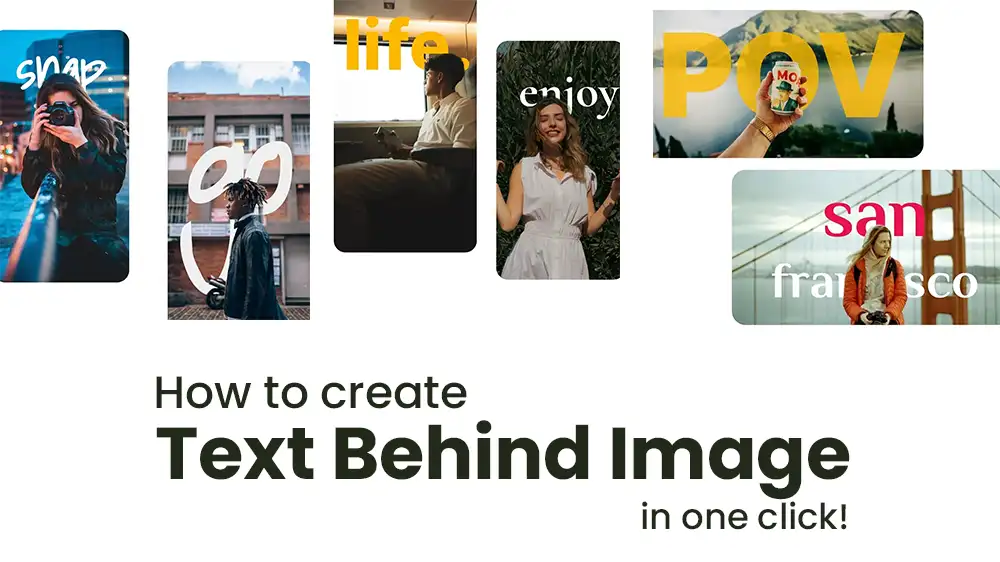

In the competitive world of social media content, standing out requires more than just good photography—it demands creative presentation that captures attention mid-scroll. Text-behind-image effects have emerged as one of 2025’s hottest design trends, creating dynamic visual depth by layering text that appears to weave behind subjects in photos. TextBehindImage.com brings this professional technique to everyone, requiring no design skills, software downloads, or steep learning curves.
What Is TextBehindImage.com?
TextBehindImage.com (also accessible at text-behind-image.com) is a free, browser-based image editor specifically designed for creating text-behind-image effects. The tool uses AI to automatically detect subjects in your photos, intelligently positioning text so it appears to exist in the same three-dimensional space as your image—some letters in front, some behind objects or people.
Originally created as an open-source project by developer Rexan Wong, the tool has inspired several similar implementations, though the original remains one of the cleanest and most straightforward options.
Key Features
AI-Powered Background Removal
The platform automatically detects your image’s main subject and background elements, creating the layering necessary for the text-behind effect. This process, which would take 30+ minutes in Photoshop for beginners, happens in seconds.
Comprehensive Text Controls
Customize every aspect of your text:
- Font Library: 50+ professional fonts, fully searchable
- Color Options: Manual color picker or random color generator
- Rotation Controls: Precise angle adjustments with slider
- Letter Spacing: Adjustable kerning for perfect typography
- Advanced Effects: Shadows, outlines, gradients, and opacity controls
Multiple Text Layers
Add unlimited text layers to your design, each with independent styling, positioning, and effects. This allows for complex, professional-looking compositions.
Platform-Specific Exports
Export in preset dimensions optimized for:
- YouTube thumbnails (1280×720)
- Instagram posts (1080×1080)
- Instagram Stories (1080×1920)
- Facebook posts (1200×630)
- LinkedIn graphics (1200×627)
- Twitter/X headers (1500×500)
Custom resolutions up to 4K quality are also supported.
Real-Time Preview
See every adjustment instantly before exporting, allowing you to perfect your design without downloading multiple versions.
How It Works
The creation process is remarkably simple:
- Upload Your Image: Drag and drop or select a photo (supports PNG, JPEG, JPG formats)
- Enter Your Text: Type your message or headline
- Customize: Adjust font, size, color, position, rotation, and effects
- Export: Download your finished design in your preferred format
The entire process typically takes under two minutes, compared to 30+ minutes for equivalent work in professional software like Photoshop.
Use Cases
Text-behind-image designs work exceptionally well for:
- YouTube Thumbnails: Eye-catching titles that stand out in crowded feeds
- Social Media Posts: Instagram, Facebook, and LinkedIn graphics that stop the scroll
- Marketing Materials: Product promotions, service announcements, special offers
- Event Posters: Concert announcements, workshop promotions, community events
- Personal Branding: Profile headers, portfolio pieces, professional presentations
Strengths
- Completely Free: No hidden costs, subscriptions, or watermarks
- No Account Required: Start creating immediately without signup
- Browser-Based Privacy: All processing happens locally in your browser—images never leave your device
- Unlimited Downloads: Export as many designs as you need
- Professional Results: Creates effects that would otherwise require expensive software and training
- Fast Workflow: Minutes instead of hours for professional effects
- Multi-Language Support: Interface available in English, French, German, Spanish, Italian, Portuguese, Chinese, Japanese, and more
- Universal Compatibility: Works on desktop computers, laptops, tablets, and smartphones
Limitations
- No Save Function: Can’t save works-in-progress; must complete designs in one session
- AI Detection Limits: Works best with clear subjects; busy backgrounds may confuse the automatic detection
- Single-Purpose Tool: Only creates text-behind-image effects; not a full image editor
- Browser Dependency: Requires modern browser (Chrome 90+, Firefox 88+, Safari 14+, Edge 90+)
- Learning Curve for Complex Designs: While basics are simple, mastering layering and effects takes practice
Privacy and Security
A standout feature: TextBehindImage.com prioritizes user privacy. All image processing happens directly in your browser using client-side technology. Your photos are never uploaded to external servers, never stored, and never accessed by the platform. This local processing approach means your creative work and personal images remain completely private.
Comparison to Alternatives
Traditional methods of creating text-behind-image effects require:
- Photoshop: $20-50/month subscription, steep learning curve, 30+ minutes per design
- Canva Pro: $12.99/month, manual masking required, still time-intensive
- GIMP: Free but complex interface, significant learning investment needed
TextBehindImage.com delivers comparable results in a fraction of the time with zero cost and minimal learning required.
Who Should Use TextBehindImage.com?
This tool is ideal for:
- Content Creators: YouTubers, influencers, and social media managers needing attention-grabbing graphics
- Small Business Owners: Creating professional marketing materials without hiring designers
- Students: Developing eye-catching presentations and projects
- Event Organizers: Designing promotional materials quickly
- Anyone Without Design Skills: Achieving professional results without the learning curve
Tips for Best Results
- Use images with clear subject separation from background
- High-contrast photos work best (subjects that stand out visually)
- Keep text concise—3-6 words typically work better than long sentences
- Experiment with different fonts to match your brand or mood
- Use the random color generator for unexpected, eye-catching combinations
- Preview at actual size before exporting to ensure readability
Final Verdict
TextBehindImage.com democratizes a design technique that previously required professional software and skills. By making text-behind-image effects accessible to everyone, it empowers creators to produce engaging, professional-quality graphics that compete with content from much larger teams and budgets.
The tool’s combination of zero cost, no signup requirement, local processing for privacy, and genuinely useful output makes it a standout resource in the crowded online design tool space. While it won’t replace comprehensive image editors for complex projects, it excels at its specific purpose: creating attention-grabbing text effects quickly and easily.
For anyone creating social media content, marketing materials, or visual presentations, TextBehindImage.com deserves a bookmark. It’s proof that powerful design tools don’t need to be expensive or complicated—sometimes the best solutions are simple, focused, and free.
Rating: 4.5 out of 5 stars
Best for: Content creators, social media managers, small business owners, anyone needing quick, professional graphics
Price: Completely free, no watermarks or restrictions
Website: textbehindimage.com or text-behind-image.com